
Ever spent minutes looking for a photo, only to find it named IMG_4587.jpg?
You’re not alone. Most images are saved with generic file names that make them difficult to identify later.
Renaming image files is a simple way to keep your photos, screenshots, design files, and business images organized. A clear file name helps you find the right image faster, manage large collections more easily, and avoid confusion when sharing files with others.
In this guide, we’ll explore the practical use cases of a Rename Image tool and show how it can help organize personal photos, travel memories, photography projects, e-commerce product images, business files, and more.
Table of Contents
Why Renaming Image Files Is Important?

Image file names play a bigger role than many people realize. Most cameras, smartphones, and software save images with default names like IMG_001.jpg or Screenshot_2026.png. While these names work at first, they can become confusing when you have hundreds or thousands of files.
Renaming image files makes them easier to identify, search, and organize. Instead of opening multiple files to find the right image, you can quickly locate it by its file name. This saves time and reduces frustration.
Clear file names also help keep photo libraries, design projects, business documents, and product images well organized. Whether you’re managing personal photos or professional assets, a consistent naming system makes image management much simpler.
In short, renaming image files improves organization, speeds up file searches, and helps you stay productive when working with large image collections.
Use Case of the Rename Image tool
The Rename Image tool is useful in everyday and professional situations. From organizing personal photos to managing business files, renaming images helps keep digital collections neat and easy to navigate. Below are some of the most common use cases where a rename photo tool can save time and improve file organization.
1. Personal photos
Personal photos capture some of life’s most memorable moments, but keeping them organized can become difficult over time. Images taken on smartphones, cameras, or downloaded from apps like WhatsApp often come with generic file names such as IMG_1234.jpg, DSC_5678.jpg, or WhatsApp Image 2026-06-19 at 12.41.44 PM.jpg. These names provide little information about the image and make it harder to find specific photos later.
Rename custom file names to your photos to make them easier to identify and organize. Instead of keeping a file name like IMG_1234.jpg, you can rename it to something more meaningful, such as Beach-Trip-2026.jpg, Graduation-Day.jpg, or Birthday-Celebration.jpg.
2. Family albums
Family albums often contain photos from important life events such as birthdays, weddings, anniversaries, and holidays. Over time, these images can become difficult to manage, especially when they are stored with generic file names like IMG_5678.jpg or DSC_1234.jpg. Without clear names, it becomes hard to remember when or where a photo was taken.
The Rename Photos tool helps you organize family albums by giving each photo a clear and meaningful name. Instead of random file names, you can use names like Family-Reunion-2026.jpg, Mom-Birthday-Celebration.jpg. This makes it easy to recognize and locate special memories in seconds.
With proper file names, your family photo collection stays organized, searchable, and easy to share with relatives whenever needed.
3. Travel photos
Travel photos usually come from different places, cities, and experiences, but they are often saved with default file names like IMG_1234.jpg or DSC_5678.jpg. After a trip, it becomes difficult to remember where each image was taken, especially when you have hundreds of travel photos stored in one folder or device.
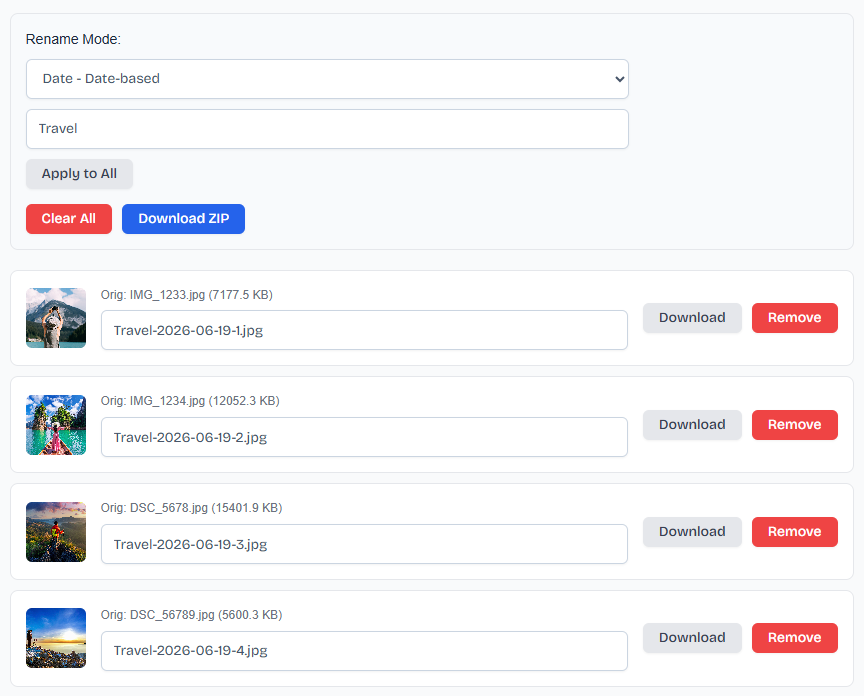
With the Rename Image tool, you can organize travel photos in a more structured way by using consistent file names. Date-based naming like Travel-2026-08-07.jpg helps you identify the exact capture date, while sequential naming, such as Travel-image-1.jpg, Travel-image-2.jpg, keeps your images sorted in a clean and understandable order.
This type of image file naming improves photo organization, makes travel albums easier to browse, and helps you quickly find specific memories without opening multiple files. Over time, it creates a clean and searchable travel photo library.
4. Photography projects
Photography projects often involve a large number of images taken during different shoots, sessions, or client work. These files are usually saved with default names like IMG_001.jpg or DSC_1023.jpg, which makes it difficult to manage multiple projects or identify specific shots later.
Photographers can keep their work organized by using clear and consistent file names. Images can be renamed based on the project or client, such as Wedding-Shoot-1.jpg, Product-Session-2.jpg, or Portrait-Session-2026.jpg. This makes it easier to separate different shoots and maintain a structured workflow.
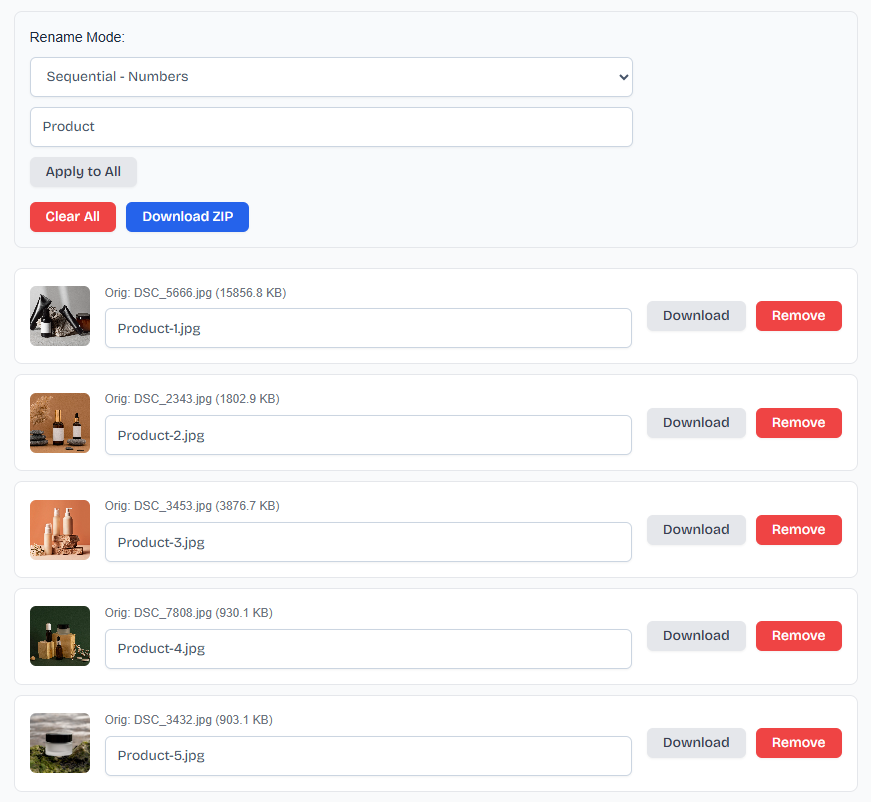
With proper image file naming, photographers can quickly locate, edit, and deliver photos, improving overall efficiency in managing photography projects.
5. E-commerce product images
E-commerce stores deal with hundreds or even thousands of product images, often showing different angles, colors, and variations of the same item. These images are usually saved with generic file names like IMG_1234.jpg or DSC_5678.jpg, which can quickly create confusion when managing a large product catalog.
Organize product images with clear and structured file names. Instead of random names, you can use formats like Black-Shoes-Front.jpg, Black-Shoes-Side.jpg, or ProductName-Blue-Variant.jpg. This makes it easier to identify products, manage inventory visuals, and upload images to online stores.
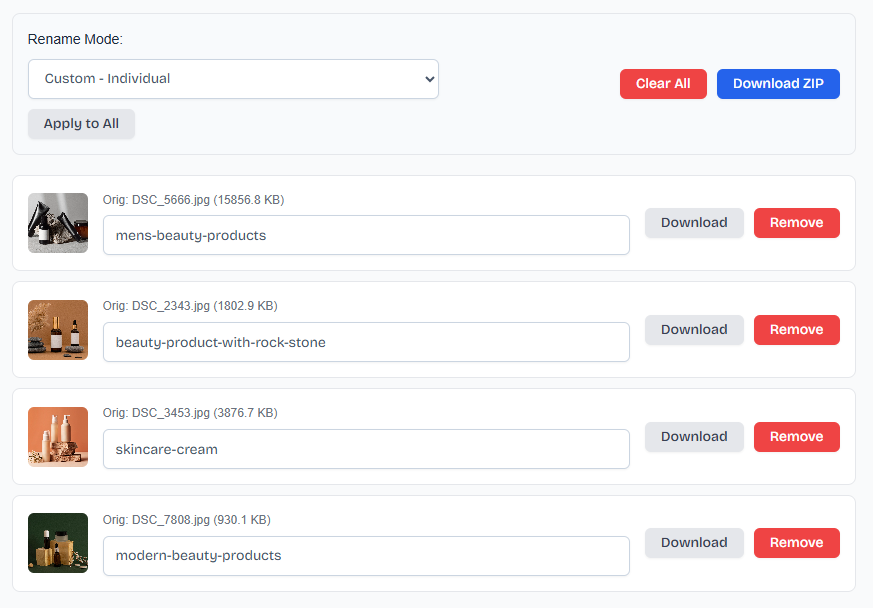
From an SEO perspective, descriptive image file names also help search engines understand what the image is about. Well-named product images can improve visibility in Google Image Search and attract organic traffic.
With consistent image file naming, e-commerce businesses can improve workflow efficiency, reduce errors, and keep their product libraries well organized for platforms like Shopify, WooCommerce, or Amazon.
6. Screenshots
Screenshots are used every day to save important information such as work notes, tutorials, design ideas, error messages, and online references. However, they are usually saved with default names like Screenshot 2026-06-19 at 12.41.44 PM.png, which makes them difficult to identify later, especially when the number of files increases.
Renaming screenshots with clear and meaningful file names helps you instantly understand what each file contains without opening it. Instead of generic names, you can use descriptive titles like Website-Design-Idea.png, Error-Message-Login.png, or Meeting-Notes-June-2026.png. This makes file management much faster and more organized.
With proper naming, screenshots become easier to search, sort, and manage, improving both personal productivity and professional workflow when handling large sets of visual information.
7. Design assets
Design assets such as logos, banners, social media graphics, and UI elements often go through multiple versions during a project. These files are usually saved with unclear names like design1.png, final-final.png, or untitled.png, which can quickly create confusion when working on large creative projects.
Renaming design files with a clear and consistent structure helps keep every version organized and easy to track. For example, files can be named as Logo-Concept-1.png, Logo-Revision-2.png, or Banner-Homepage-Final.png. This makes it simple to identify different stages of the design process and avoid mixing up versions.
Well-structured file names also improve collaboration between designers, developers, and clients by making it clear which asset is the latest and ready for use. This ensures a smoother workflow and better project management across all design tasks.
8. Business image and Documents
Businesses deal with a large number of images and documents every day, including reports, presentations, marketing graphics, invoices, and internal files. These files are often saved with unclear names like IMG_001.jpg, Document1.pdf, or New File (2).pdf, which can make it difficult to find the right file when needed.
Renaming these files with a clear and structured naming system helps improve organization and efficiency. For example, files can be named as Sales-Report-June-2026.pdf, Marketing-Banner-Summer-Campaign.jpg, or Invoice-ClientName-001.pdf. This makes it easy to understand the content of each file at a glance.
Well-named business files improve workflow, reduce confusion, and make collaboration smoother across teams. It also helps maintain a professional and organized digital workspace where important documents and assets can be accessed quickly.
How to Rename Image Files Quickly?
Renaming image files can be time-consuming when done one by one, especially if you have hundreds or thousands of images. A simple and fast approach is to use a Rename Image tool to rename multiple image files at once.
Start by selecting the images you want to rename. Then choose a naming format that fits your needs, such as custom names, sequential numbering, or date-based structure. For example, you can rename files like Travel-2026-08-07.jpg or Travel-image-1.jpg, Travel-image-2.jpg to keep everything organized.
Once you apply the changes, you can download your renamed images individually or export them all together in a single ZIP file.
Final Words
Renaming image files is a simple but powerful way to keep your photos, screenshots, design assets, and business files organized. It helps you avoid confusion, save time, and quickly find the right image when you need it.
Whether you are managing personal photos, travel memories, photography projects, or e-commerce product images, a clear naming system makes your workflow much smoother. With the Rename Image tool, you can rename multiple files in just a few clicks and keep everything neatly structured.
A small change in file naming can make a big difference in your overall digital organization and productivity.